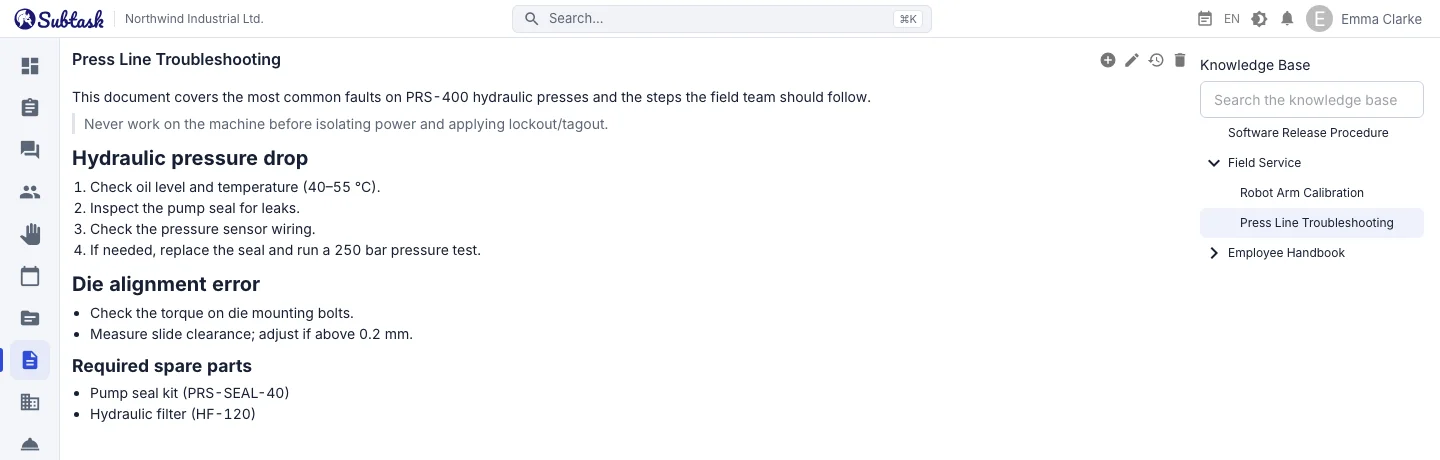
- Nested pages Organize documents in a tree and navigate with breadcrumbs.
- Smart search Search titles and content with accent-insensitive matching.
- Rich text Headings, lists, quotes, code blocks and links.
- Access rules Documents are available to the team in their linked workspace.
Organize documents in a tree
Each document can sit under another document, creating a natural structure such as 'HR Handbook → Leave → How do I take annual leave?' The document tree on the left shows the full structure; breadcrumbs above the document take you up a level, and child documents are listed below its content.
The home page shows the 20 most recently updated documents you can access, so you can keep track of changes across the team.
An editor for readable documents
The document editor supports bold, italic and strikethrough text, three heading levels, bulleted and numbered lists, quotes, code blocks and links. Color and font selectors are deliberately left out: documents stay equally readable in light and dark themes, with a consistent layout across the team.
You can create a document with just a title and no content, which is useful for section headings such as 'Sales'.
Accent-insensitive search
A knowledge base is useful only if you can find what you need. Subtask searches titles and content, returning results with match counts, a content excerpt and highlighted matches.
People often type searches without accents. Search is therefore accent-insensitive: cafe finds a 'Café' document, and resume finds 'Résumé'. Searches require at least two characters and return only documents you have permission to read.
Who can see what?
Link a document to a workspace and, optionally, a department. Access rules are enforced on the server:
- People with permission to view or manage all documents, such as administrators, can see every company document.
- Other users can read documents they created or last updated, documents linked to workspaces they can access, and documents under a parent document they can access.
- Documents can be edited and deleted by people with permission to manage all documents, as well as the person who created or last updated the document.
Deleting a document also deletes its children, so the server checks your permissions for every affected document.
Activity history
When the Activity History service is enabled, anyone who can read a document can open its history to see who changed it and when.
What belongs in a knowledge base?
| Team | Example documents |
|---|---|
| HR | Employee handbook, leave policy, onboarding checklist |
| Technical service | Troubleshooting steps, machine maintenance instructions, spare part codes |
| Software | Setup guide, deployment procedure, architectural decisions |
| Sales | Price list notes, proposal templates, common customer questions |
| Quality / Health and Safety | Procedures, instructions, emergency plan |
Technical service teams collect solutions to recurring faults from the help desk in the knowledge base. When a new document is published, you can notify the team with an announcement.
Knowledge base on mobile
On small screens, the document tree becomes a collapsible drawer; add, edit, history and delete actions appear in the mobile menu. Technicians in the field can open instructions on their phones.
Frequently asked questions
Is there a limit on knowledge base documents?
Does search work with accented characters?
Can I share a document with just one team?
Are document versions stored?
Can it replace Confluence or Notion?
Bring your team together in one place
Get started with Subtask for free, invite your team and create your first task in minutes. The price does not change with your user count.
Create a free account