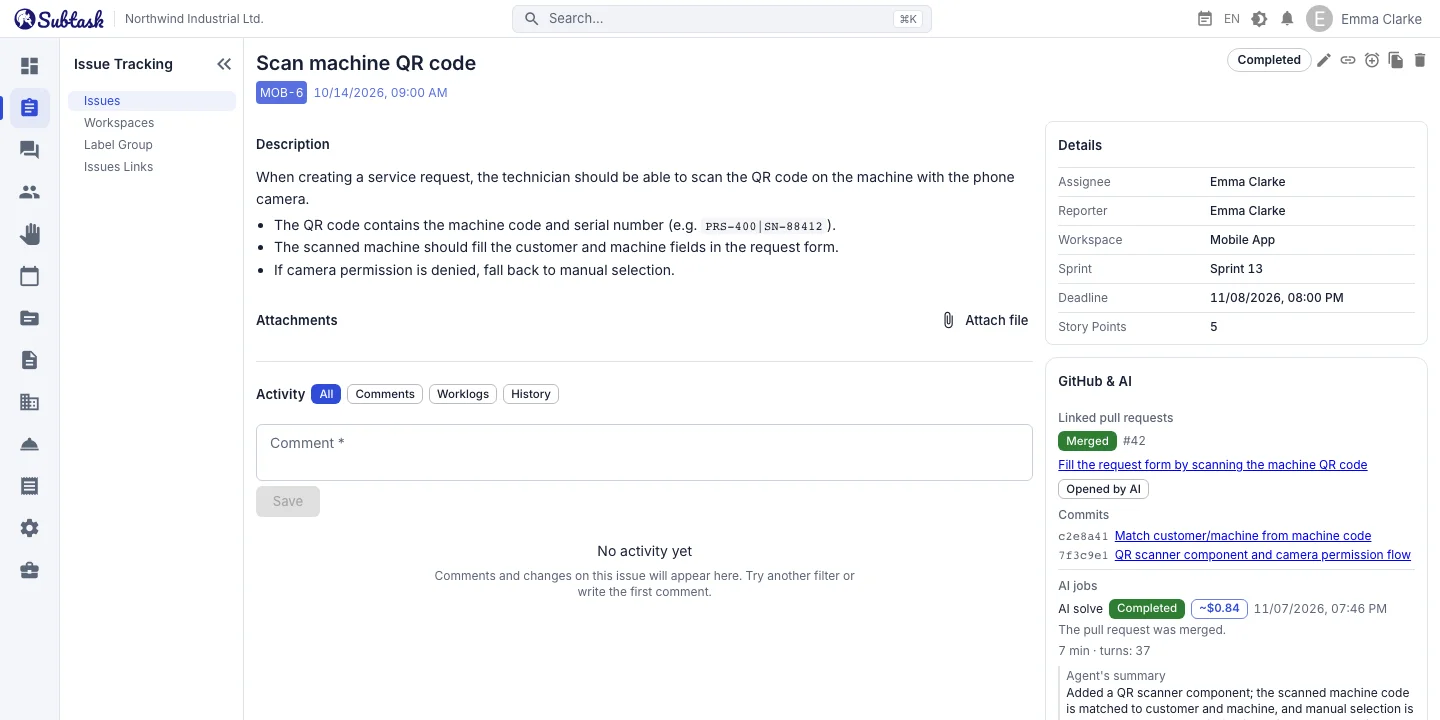
- GitHub integration PRs and commits are automatically linked to issues by their issue keys.
- Solve with AI Send an issue to a Claude or Codex agent and get a PR back.
- MCP server Read and update issues from AI assistants such as Claude and Cursor.
- API tokens Scoped, expiring and revocable access keys.
GitHub integration: issues alongside code
Install the Subtask GitHub app from company settings, then link your repository to a workspace. Once connected:
- PRs containing an issue key, such as
WEB-128, in their title, description or branch name are linked to the relevant issue. - Commits containing an issue key in their message are listed under the issue.
- The issue details show whether the PR is open, draft, closed or merged.
Events from GitHub are verified by signature. You can change or disconnect the linked repository at any time.
Solve with AI: from issue to PR
Click Solve with AI on an issue with a clear description and Subtask triggers the workflow in your linked repository. The agent runs code in your repository, in your GitHub Actions environment, creates a branch and opens a PR. The process works as follows:
- The issue is sent to AI; a second AI run cannot be started for the same issue.
- When the PR opens, the issue moves to your chosen status, such as In Review, and the PR link is added as a comment.
- Review the PR. If you want changes, write your instructions and request a revision; the agent updates the same PR.
- When you merge the PR, the issue moves to completed status.
- If the agent needs more information to understand the issue, it moves to your chosen status and the question is posted as a comment.
The AI run history shows each run's status, summary, usage and cost information when available, and links to the PR and Actions run. Common failure causes, such as a missing AI key in the repository, are shown with steps to resolve them.
Your AI provider, your cost limit
Configure AI providers at company level: Claude, Codex, a Codex subscription or your own custom workflow. For built-in providers, view and download the workflow file and follow the setup guide step by step. Your AI key stays in your GitHub repository's secrets; Subtask cannot see it.
For each workspace, enable or disable AI, select a provider and base branch, and set a monthly issue count and cost limit. The screen shows this month's usage, known estimated cost and remaining allowance. A readiness check explains anything missing from the repository or workflow setup.
Draft issue descriptions with AI
Generate a draft description from the issue title and existing description. Preview the result, regenerate it if needed and append it to the current description when you are happy with it. A well-written description also helps Solve with AI produce better results. This feature has a monthly quota per company and appears when AI configuration is enabled on the server.
MCP server: connect your AI assistant to Subtask
Add the Subtask MCP server to Claude Desktop, Claude Code, Cursor or another MCP-compatible AI assistant. Your assistant can then perform these actions in Subtask through chat:
- List workspaces and issue statuses
- List issues by workspace, sprint or person, and read issue details
- Create issues; update summary, description, assignee, sprint, due date, estimate and story points
- Add comments and change status
- Link issues with a relationship type
- Start an AI solve run for an issue
Requests such as 'List my open issues in this sprint and summarize the description of the most urgent one' can be answered without opening Subtask.
API tokens: scoped access with expiration
Create API tokens for your own automations. Give each token a name and select its scopes:
| Scope | Allows |
|---|---|
workspaces:read | Read workspaces |
issues:read | Read issues |
issues:write | Create and update issues |
ai:run | Start AI solve runs |
The full token is shown only once, when it is created. Tokens have an expiration date, up to 365 days. The list shows the prefix, scopes, status, last use and expiration date, and you can revoke any token. A token cannot exceed its owner's role permissions; requests from inactive users or expired tokens are rejected.
Frequently asked questions
Does AI merge my code automatically?
Do I need to give Subtask my AI key?
Which AI models can I use?
Is the MCP server paid?
Are GitLab or Bitbucket supported?
Bring your team together in one place
Get started with Subtask for free, invite your team and create your first task in minutes. The price does not change with your user count.
Create a free account