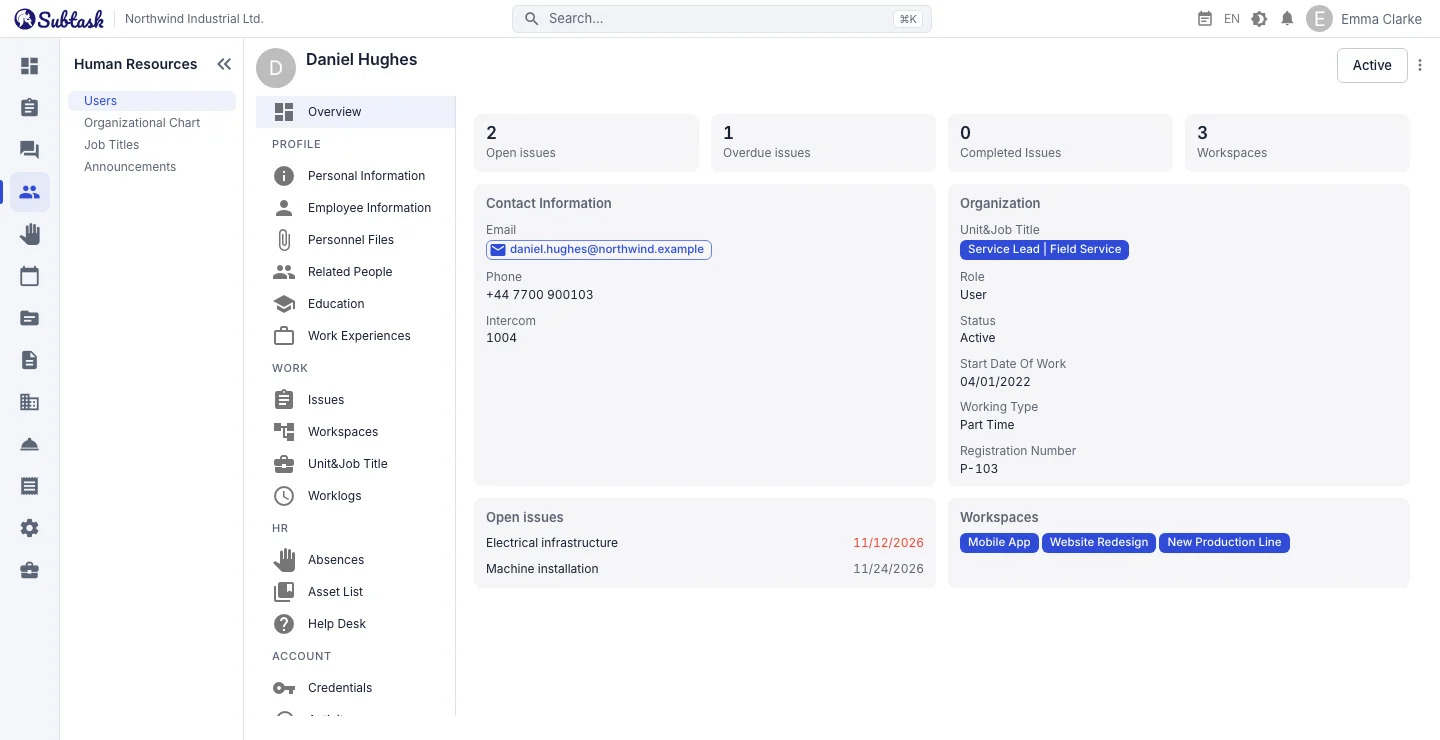
- Employee profile Overview, profile, work, HR and account sections.
- Personnel files Store documents such as contracts, diplomas and medical reports.
- Organization chart View department and job title hierarchies as trees or network diagrams.
- Roles and permissions Control who can view and edit each type of information.
Employee list and Excel export
View employees in a table or list: first name, last name, email, phone, job titles, departments, education, role and status. Choose which columns to display and export the list to Excel (.xlsx).
Add and invite a new employee with their email, first name, last name and role. Use the employee profile to change account status or role, update the profile photo and resend the verification email. Deleting an employee with open issues or outstanding equipment assignments is blocked, with the reason shown.
What's in an employee profile?
- Overview: open, overdue and completed issues assigned to the employee.
- Personal information: first name, last name, date of birth, phone, address; when HR fields are enabled, gender, military service status, marital status, nationality and identification number.
- Employment details: start date, contract end date, employment type, salary and currency, employee number, phone extension.
- Education: education type, country, university, department, graduation year and grade, degree information.
- Work experience: previous companies, start and end dates.
- Relatives and contacts: emergency contacts and family details; relationship, name, date of birth, identification number, phone.
- Personnel files: upload, list, download and delete documents.
Tabs on the same profile also open the employee's leave records, work logs, issues, workspaces, department memberships, assigned equipment and help desk tickets.
Personnel files: documents within the profile
Employment contracts, ID copies, diplomas, medical reports, social security / payroll registration forms, certificates… Upload each document to the employee's profile with a description. Documents are listed with their file names and upload dates and can be downloaded when needed. Document and image types are checked. Managing personnel files requires a separate permission; only the HR team can see these documents.
Departments, job titles and organization charts
Create departments such as Head Office → Operations → Technical Service with a name, description and parent department. Switch between a hierarchical table and a network diagram. Department details include tabs for members and linked documents.
Define job titles with parent titles in the same way, such as Managing Director → Technical Director → Service Supervisor → Technician. When adding an employee to a department, link one or more job titles to their membership there. The same person can therefore hold different roles in two departments.
Department memberships are also used in other modules: leave approver candidates come from department managers, help desk categories can be linked to a department to limit assignee choices, and knowledge base documents can be linked to departments.
Roles and detailed permissions
Subtask includes admin and user roles, and you can create company-specific roles such as HR Specialist, Technical Service Supervisor or Accounting. Select permissions for each role in a table. HR provides separate view and manage permissions for users, relatives, education, experience, personnel files, departments and job titles. Only authorized people can see sensitive fields such as salary.
A user can always open their own profile. Other employees' profiles are available to people with permission to view or manage users.
HR alongside the team's daily work
In a separate HR system, employees rarely open their own information. In Subtask, the same account is also used for issues, chat and the calendar, so the employee list stays current through daily use: new employees are invited on day one, and departing employees' accounts are deactivated in one place.
Frequently asked questions
Is the HR module free?
Can I export the employee list to Excel?
Can everyone see salary information?
Does it calculate payroll?
Can I view an organization chart?
Bring your team together in one place
Get started with Subtask for free, invite your team and create your first task in minutes. The price does not change with your user count.
Create a free account